
What does Rypl hide automatically?
Updated
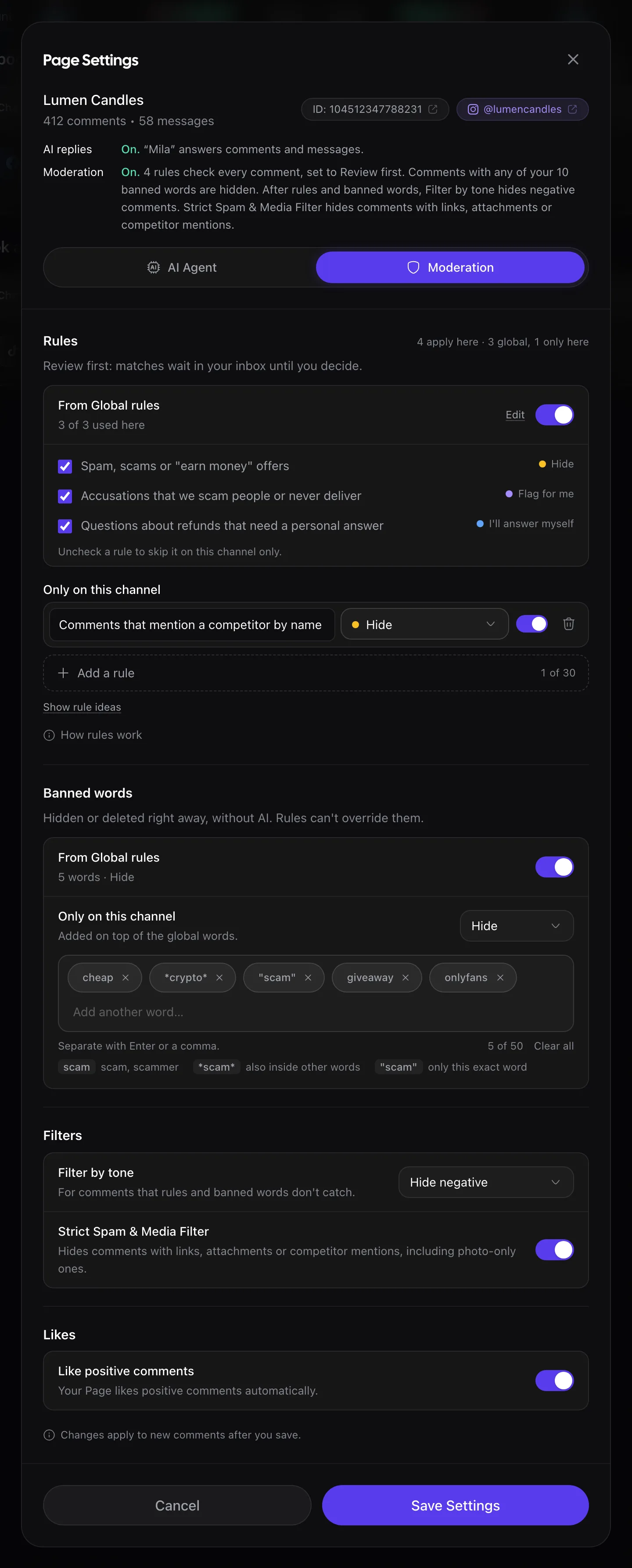
Rypl hides what you turn on: banned words, moderation rules (Pro and Ultra), and the channel's Filter by tone and Strict Spam & Media Filter. The sign-up sets these up from your business description, and then spam, scams and hate come down within seconds. Spam is flagged in about 1.7 seconds on average (RYPL's own measurement). On Facebook, 94% of the comments Rypl hides are hidden within a minute of being posted, Meta's delivery time included (RYPL data, Q3 2026).
| Layer | What it catches | Plans |
|---|---|---|
| Banned words | Comments with words you list. Hidden or deleted right away, without AI | Every plan |
| Moderation rules | Anything you can describe in plain words, such as "links to other shops" | Pro and Ultra |
| Filters | What rules and banned words don't catch: Filter by tone and the Strict Spam & Media Filter | Every plan |
Blocked authors and banned words are checked first, without AI, and rules can't override them. Hide all, Delete all and the Strict Spam & Media Filter act whatever your rules say. Hide negative and Delete negative only touch comments no rule matched.
Is moderation on for every channel?
The sign-up creates Global rules and banned words that cover the channels you connect, and turns on the filters for the channels you pick. On a channel you add later, Filter by tone and the Strict Spam & Media Filter start Off. Its row on Channels shows Moderation: On or Off, and its Moderation tab shows what applies there.
What moderation doesn't touch
- Direct messages. Rules, banned words, filters and blocks act on comments only.
- Photo- or video-only comments are skipped by rules; the Strict Spam & Media Filter hides them.
- Earlier comments. Changes apply to new comments after you save.
Strict Spam & Media Filter
A channel filter that hides comments with links, attachments or competitor mentions, including photo-only comments. Turn it on in the channel's Moderation settings.
Where to see what was hidden
In Conversations, filter by All hidden or deleted. Each hidden comment says why: banned words, your rules, the tone filter or you. See How do I see hidden comments?
What Rypl doesn't hide
Complaints, on Facebook and Instagram. By default a complaint stays visible, and if it has no reply it shows in Needs attention for a person to answer. If you want negative comments hidden too, use Filter by tone.
Related
Suggest improvements
Suggest improvements reads your agent's recent replies and the questions it couldn't answer, then drafts new Q&A and instruction changes for you to add.
Banned words
Comments containing a banned word are hidden or deleted right away, without AI. Up to 50 words per channel, on every plan.