
How do I set my brand voice in Rypl?
Updated
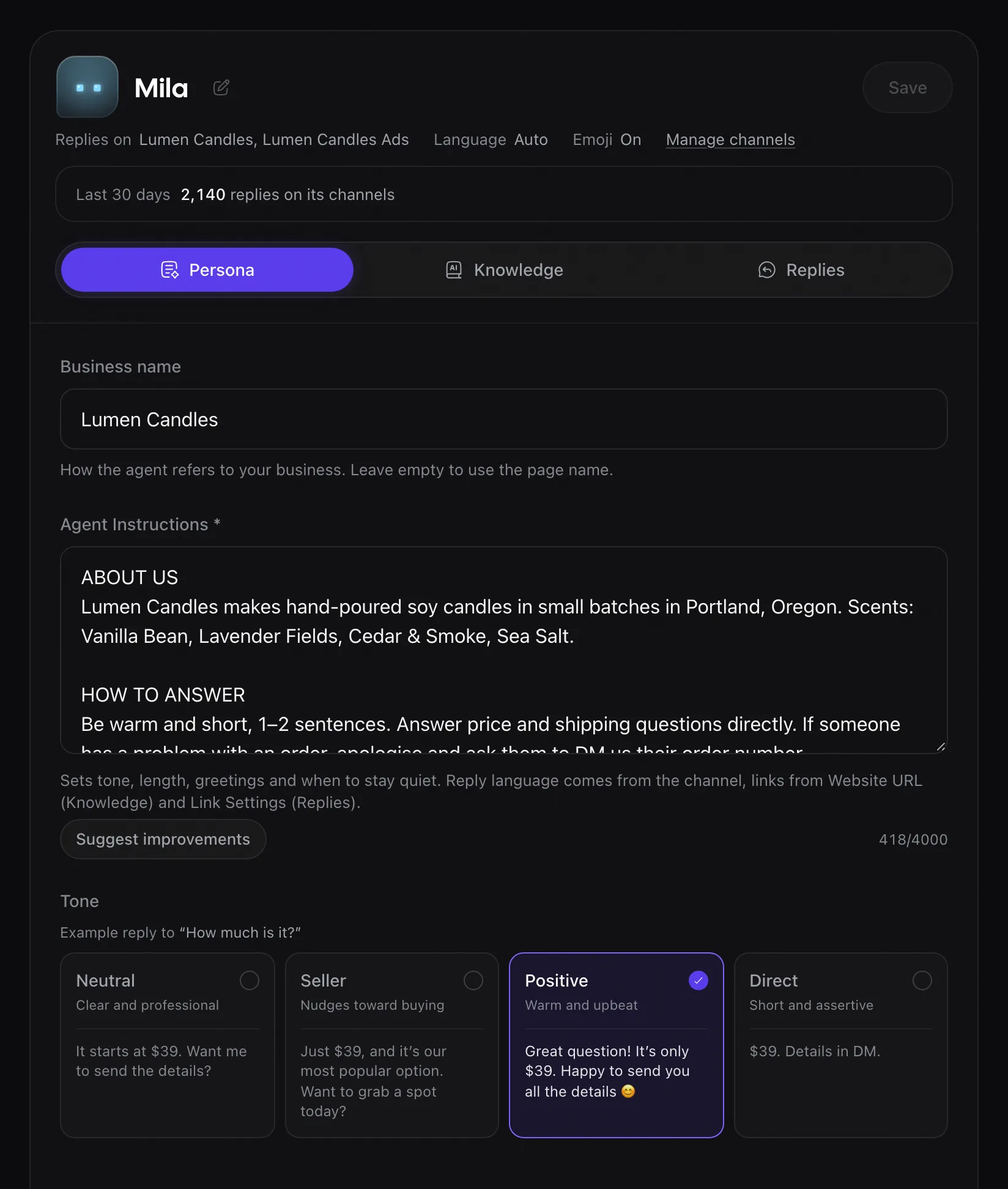
In Rypl, the brand voice comes from two agent settings: a tone (Neutral, Seller, Positive or Direct) and instructions of up to 4,000 characters. Both live on the agent, so each brand you run can sound different.
Tone
Pick the tone on the same Persona tab. Each option shows an example reply to "How much is it?":
| Tone | What it sounds like |
|---|---|
| Neutral | Clear and professional: "It starts at $39. Want me to send the details?" |
| Seller | Nudges toward buying: "Just $39, and it's our most popular option. Want to grab a spot today?" |
| Positive | Warm and upbeat: "Great question! It's only $39. Happy to send you all the details 😊" |
| Direct | Short and assertive: "$39. Details in DM." |
Instructions
Agent Instructions, on the agent's Persona tab, take up to 4,000 characters. Write them the way you would brief a new team member:
- "Answer in two sentences at most, then give the product link."
- "Never promise a delivery date; give the range from the shipping page."
- "If you don't know, say a teammate will reply, and stop."
- "Use formal address in German and French."
"Be nice" or "sound human" are too vague to help.
Facts belong in the knowledge base. To send a reply word for word, use a reply rule with My text (Pro and Ultra): with Q&A, the agent still writes the reply itself.
Business name
Business name, also on the Persona tab, is how the agent refers to your business. Leave it empty to use the Page name.
Emojis
Emojis in replies is a channel setting: when it is on, the agent adds an emoji now and then, when it fits.
How a reply is written
Rypl reads the comment, decides whether to answer it, and writes the reply from your instructions, tone and knowledge base, in the commenter's language.
Knowledge base
Your website, Q&A answers and up to 3 documents (PDF, TXT, DOCX or a CSV product list, 3 MB each). On every plan; it learns when you save.