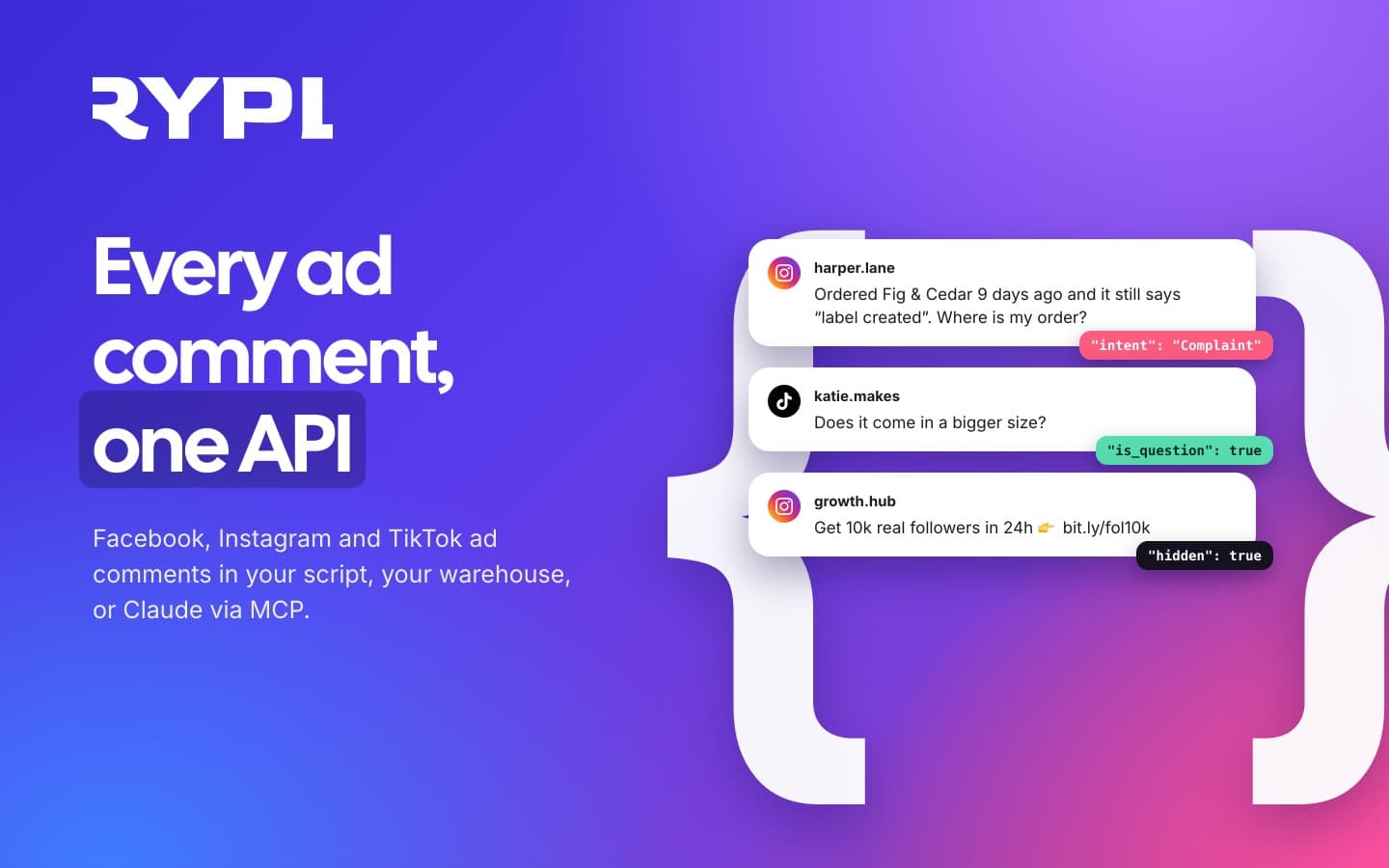
There are two ways to get ad comments out of Facebook, Instagram and TikTok. Build it yourself on each platform's API: Meta's Graph API for Facebook and Instagram, with a Meta app, Page permissions, App Review for Pages you don't own and a lookup to find the post behind every ad, and TikTok's API for Business for TikTok ads. You get the text and the author; whether a comment is a complaint, and why it was hidden, is yours to work out. Or use one Rypl key. The Rypl API returns comments from all three platforms, plus Facebook and Instagram DMs, in one format, already read for sentiment, intent and urgency, with what Rypl hid and why. The same key connects an AI app like Claude Code, Cursor or Gemini CLI through Rypl's MCP server, so you can ask "what are customers complaining about this week?" in plain words. It's on Pro and Ultra, and it can't reply or delete.
A customer asked us how to get their ad comments through an API. Rypl's API and MCP server went live on November 12, 2026, and this post covers both routes to the same comments: building it on the platforms' own APIs, and doing it with one Rypl key. The output below is real, from Rypl's demo account, a made-up candle shop called Lumen Candles.
Why get ad comments out of the inbox?
Comments are where buyers tell you, unasked, what is wrong with an ad, a product or an order. In an inbox they get answered one at a time. Outside it they become data you can count, rank and join with the rest of your numbers:
- A weekly complaints digest without reading every thread.
- The ad that draws the most complaints, next to what it costs.
- Comments joined with spend and orders in your data warehouse, by ad and post id.
- A check of what your AI agent promised customers, so someone keeps those promises.
- An audit of what was hidden and why, for your team or a client.
How to get comments from the Facebook and Instagram API yourself
Meta's Graph API returns the comments on Page posts and Instagram media, ads included, once your app holds the right permissions and a Page access token. Expect to set up five things:
- A Meta app and a Page access token with
pages_read_user_content, which, in Meta's words, "allows your app to read user generated content on the Page, such as posts, comments, and ratings", pluspages_read_engagementfor the Page's own posts (Meta permissions reference). - Instagram permissions:
instagram_basicandinstagram_manage_comments(IG Media comments). - App Review, if the app reads Pages you don't own or manage, and Business Verification, which Meta requires for every app that asks for Advanced Access.
- The post behind each ad. An ad's comments sit on its post, often one that was never published on the Page. The ad creative's
effective_object_story_idis "the ID of a page post to use in an ad, regardless of whether it's an organic or unpublished page post"; for Instagram it'seffective_instagram_media_id(Ad Creative reference). - Paging.
GET /{post-id}/commentsreturns top-level comments by default;filter=streamadds the replies, and Meta warns that posts with tens of thousands of comments can hit limits while paging (Comments reference). Instagram returns at most 50 comments per request, and Meta notes that "comments cannot be filtered by timestamp".
What comes back is the comment's text, author and time. Whether it is a complaint, a question about shipping or spam, and why a comment was hidden, is left to you.
How to get TikTok ad comments through the API
TikTok's API for Business lists the comments on your ads with GET /open_api/v1.3/comment/list/. It takes the ad account's advertiser_id, a time window (start_time, end_time) and a TikTok access token, and returns 10 comments per page by default (TikTok's Comments API). Its token, paging and data format differ from Meta's, so a script that covers all three platforms talks to two different APIs.
How to get all three through the Rypl API
If your Facebook Pages, Instagram accounts and TikTok ad accounts are connected to Rypl, one key returns their comments in one format, with Rypl's analysis and moderation attached. Facebook and Instagram DMs come through the same key.
Getting the key takes about a minute. In Rypl, open Settings, find MCP and API Keys, click Connect, pick Other app or API, name the connection and click Create key. The window shows the REST API address and the key, once.
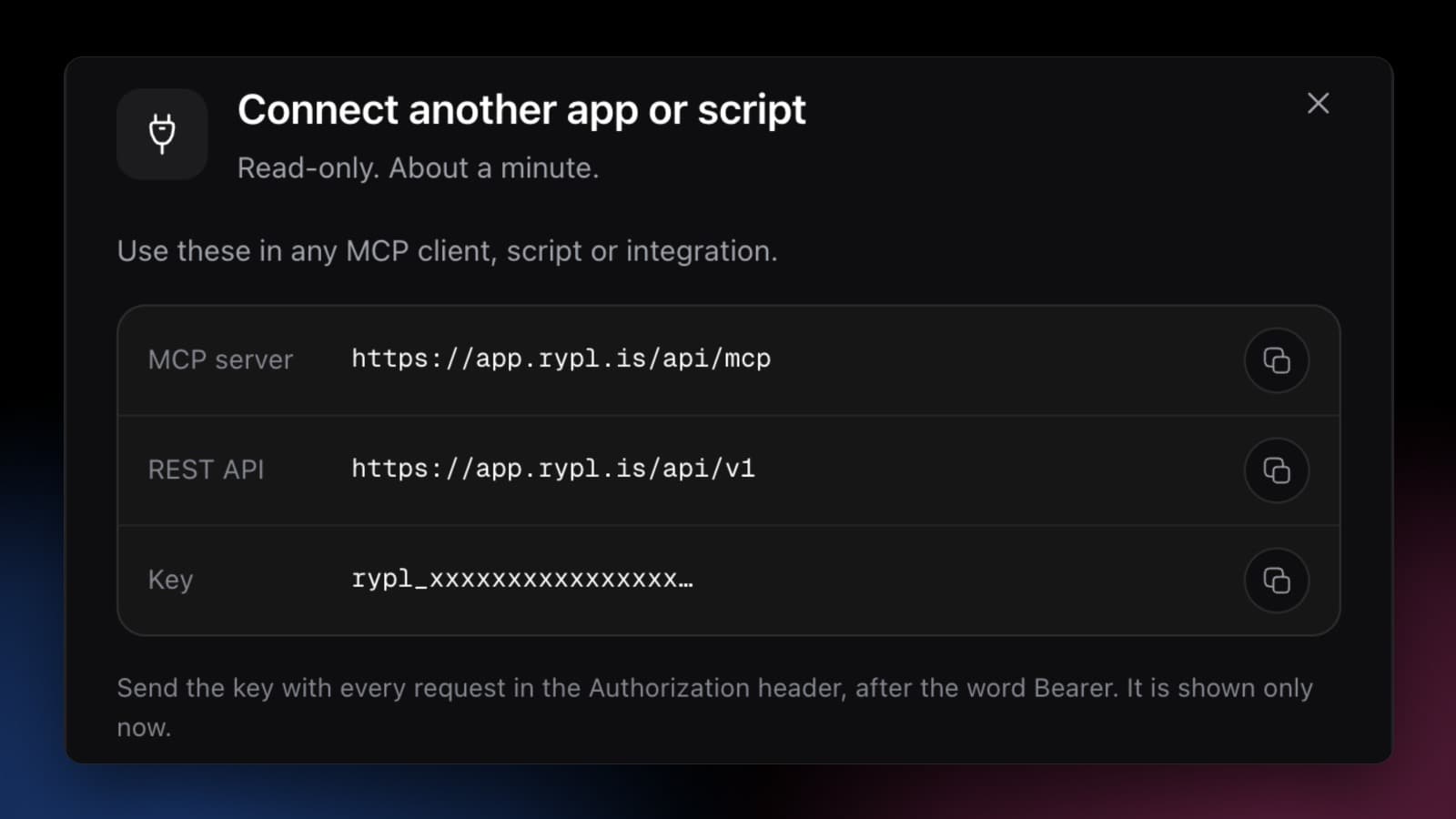
Then ask for the last week of comments:
curl "https://app.rypl.is/api/v1/comments?period=last_7_days" \
  -H "Authorization: Bearer rypl_xxxxxxxx…"
This is one row of the real answer from the demo account, with the long texts cut short:
{
  "type": "comment",
  "platform": "instagram",
  "created_at": "2026-11-12T19:48:00Z",
  "text": "Ordered Fig & Cedar 9 days ago and it still says \"label created\"…",
  "post": {
    "kind": "ad",
    "url": "https://www.instagram.com/p/DFig8kCedar/"
  },
  "analysis": {
    "sentiment": "negative",
    "intent": "Complaint",
    "urgency": "high",
    "severity": 3
  },
  "hidden": false,
  "ai_reply": {
    "text": "So sorry for the wait, Harper. Launch orders ship in waves…",
    "agent": { "name": "Mila" },
    "response_seconds": 36
  }
}
The comment comes with the ad it was left on, what it wants and how urgent it is, and what the agent answered and how fast. A hidden comment also says why: banned words, one of your rules, the tone filter or the spam filter.
To keep a copy in a warehouse up to date, export once with since, then ask for updated_since the time of your last run: that brings new rows and the ones Rypl has changed since, newly replied to or hidden. For counts, /summary adds them up for a period. On the demo account's last seven days it gave 20 comments: 9 negative, 8 of them complaints, 4 questions and 3 spam comments, all 3 hidden.
The full list of filters and fields is in What endpoints does the Rypl API have?, and the export recipe in How do I export comments and messages with the Rypl API?
Ask an AI assistant about your comments (MCP)
MCP, the Model Context Protocol, lets an AI app call tools on another service. Rypl's MCP server gives an assistant the same reads as the API, as tools it picks by itself: list comments and messages, count them for a period, rank the ads that draw complaints, list what needs your attention. You ask in plain words and it chooses the calls.
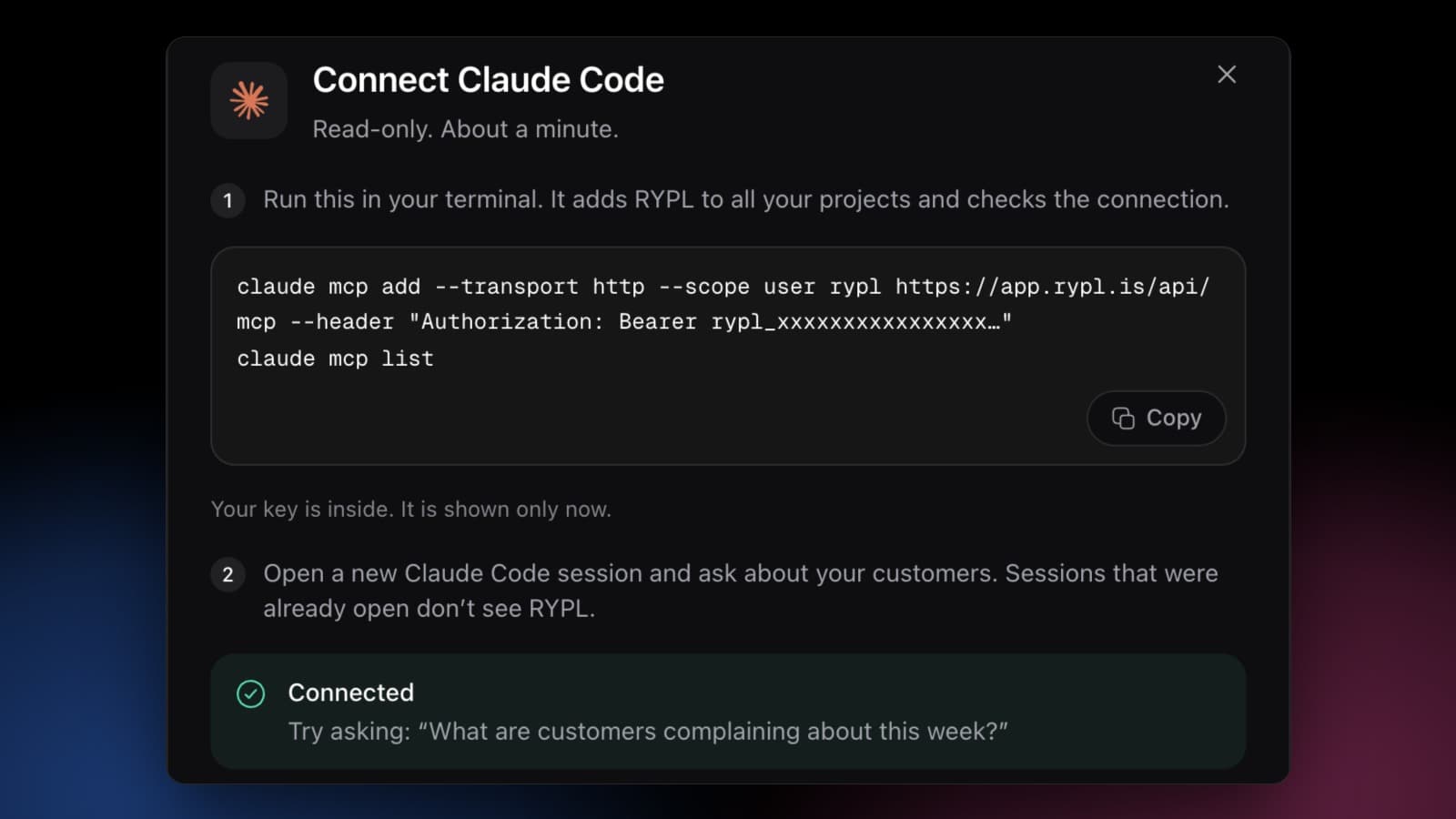
Connecting Claude Code takes two lines in a terminal. The second one checks the connection, and the Rypl window turns Connected a few seconds later:
Cursor and VS Code install it with one button, Gemini CLI with the same two lines, and any other MCP client takes the server address and the key. The claude.ai and ChatGPT connectors aren't supported yet. Step by step: How do I connect Claude Code, Cursor or another AI app to Rypl?
This is what Claude Code answered on the demo account, asked "What are customers complaining about this week?". It made five calls, among them a summary by intent, the week's negative comments and the posts ranked by negative comments, and wrote, in part:
Most complaints this week are about slow shipping on the Fig & Cedar launch. Volume is low: 20 comments since Nov 6 and no DMs. 9 of the 20 are negative and 8 are complaints.
1. Late Fig & Cedar orders (4 complaints, Instagram launch ad) […] dana_k: "Two weeks and nothing. Not ordering again." No reply yet. Your "Orders late more than 10 days" rule flagged it for you to answer.
[…]
Promises the AI agent (Mila) made that you should check […] "Ships tomorrow" and free shipping on the next order for Sam. "Ships tomorrow" for Harper, plus "we just sent the tracking link to your email". […] If nobody on your team is actually doing these things, they'll turn into the next round of complaints.
The last part is the one a person scrolling an inbox tends to miss: the complaints are about shipping, not the candle, and the replies made commitments someone has to keep. Questions that work the same way:
- "Which ad gets the most complaints?"
- "What did Rypl hide yesterday and why?"
- "Which questions has nobody answered?"
- "Who left a phone number?"
- "How fast does my agent reply?"
More of them, and what each one reads, in What can I ask an AI app about my comments?
What a connected app can and can't do
Every connection gets its own key and its own permissions, chosen when you create it: comments, direct messages and settings to read, all channels or a few, and when access ends.
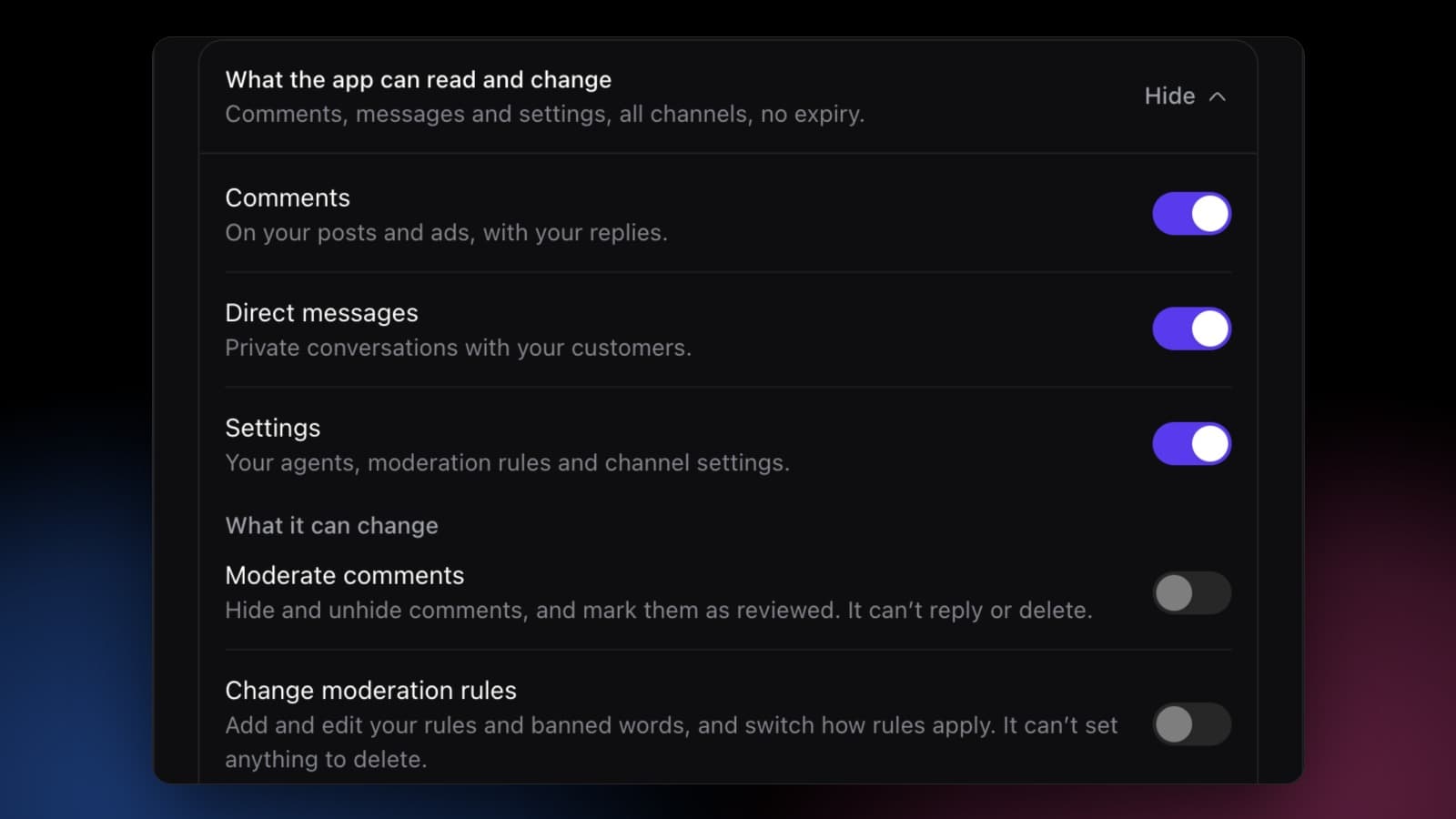
- Read what you allowed, on the channels you picked.
- Moderate comments, if you switch it on: hide and unhide comments on the platform, and mark them as reviewed.
- Change moderation rules, if you switch it on: add and edit your Global rules and banned words. Never to delete anything.
- No replies and no deletes. Replies come from your Rypl agent, with your brand voice, knowledge base and reply rules, so they stay the same whichever app asks. A delete can't be undone, so an app hides instead.
The key is shown once and opens only the API, not your dashboard. Disconnect an app in Settings and its key stops working at once. The details: What can a connected app read and change?
Which route should you pick?
| Platform APIs | Rypl API and MCP | |
|---|---|---|
| Platforms | Meta for Facebook and Instagram, TikTok separately | Facebook, Instagram and TikTok ads, one format |
| Setup | Developer apps, permissions, App Review for Pages you don't own | One key from Settings, about a minute |
| Comments on ads | Look up the post behind each ad first | Included, marked as ads |
| Sentiment, intent, urgency | Not included | On every row |
| Why a comment was hidden | Not included | On every hidden row |
| AI assistant | Build your own tools | MCP server for Claude Code, Cursor, VS Code, Gemini CLI |
| Price | Free, plus the engineering time | Rypl Pro ($49/month) or Ultra ($89/month), trial included |
The platform APIs are the way to go if you need only the raw text from your own Pages and have someone to build and keep the integration. If you want the comments already sorted into complaints, questions and spam, from three platforms at once, or you want to ask an assistant about them this afternoon, the Rypl key gets you there in a minute.
Plans and limits
The API and MCP server are on Rypl's Pro and Ultra plans, the 7-day trial included. An account can hold up to 10 connections, each with its own key, and each connection can make 120 requests a minute. Everything else is in the API and AI apps docs.
To try it on your own comments, start a free trial, connect your Facebook Page, Instagram account or TikTok ad account, and create a key under MCP and API Keys.